
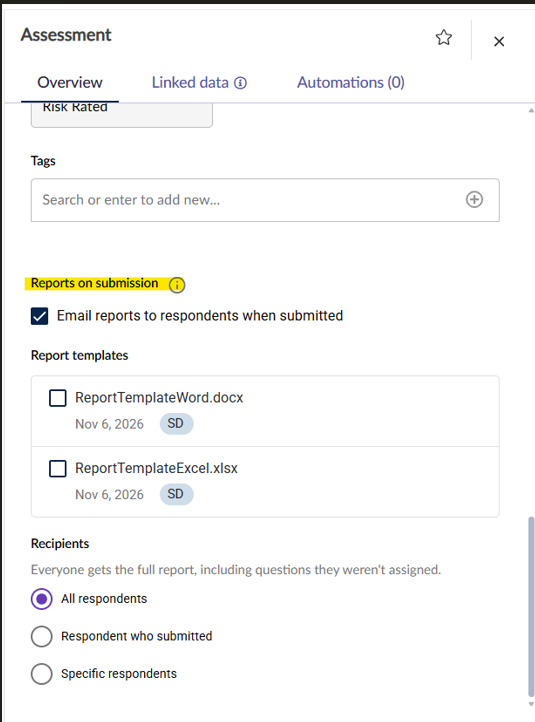
You can configure an assessment to automatically generate and email reports to selected recipients whenever it is submitted. This removes the need to generate and send the reports manually after each submission.
This feature is available for QBA and RBA assessments. An assessment owner or another user with permission to edit the assessment can configure it.
This is only available for advanced report templates and not the older assessent report templates.
Configure reports on submission
- Open the assessment's Overview tab.
- Enable the relevant setting:
- QBA: Select Email reports to respondents when submitted.
- RBA: Select Email report to the submitter when submitted.
- Select one or more report templates.
- For a QBA, select the recipients. For an RBA, the report is sent to the user who submits the assessment.
Select report templates
Upload report templates to the assessment's Reports tab before selecting them for automatic delivery. All templates uploaded to the tab are displayed for selection. For guidance on creating and uploading templates, see the advanced assessment report generator.
You can select one or more templates. Supported formats are Microsoft Word (.docx) and Microsoft Excel (.xlsx). One report attachment is generated for each selected template.
Select recipients for a QBA
Choose from the following recipient options:
- All Respondents: All users assigned as respondents, including those assigned through groups or organisational units.
- Respondent Who Submitted: Only the user who submitted the assessment.
- Specific Respondents: Selected users or groups from the assessment's respondent list.
Recipients for an RBA
Reports are sent to the user who submits the assessment. RBAs do not support multiple assigned respondents, so the Recipients section is not displayed.
For both assessment types, a copy is also sent to the assessment owner automatically. This cannot be disabled.
When reports are sent
Reports are generated and emailed every time the assessment is submitted, including the initial submission and any resubmissions after the assessment has been reopened.
Submission completes immediately for the respondent. Report generation and email delivery happen in the background.
Email details
The email subject is 6clicks - [Assessment Name] - Assessment report. The message is sent from the tenant's configured sender email address (if applicable) or the default 6clicks no-reply address.
The email uses the tenant's configured logo and colours, or the 6clicks defaults. Its body includes the assessment name and the team name associated with the assessment. Generated reports are included as attachments.
When settings can be changed
You can modify the Reports on Submission configuration while the assessment is in Draft, Published or In Progress.
The settings become read-only when the assessment is Completed, Reviewed or Closed. The existing configuration is retained and displayed, but cannot be edited.
Permissions and delivery
- Only users with permission to edit the assessment can configure reports on submission.
- Emails are sent only to active, non-deleted users.
- If the tenant or team is deactivated after configuration but before submission, report emails will not be sent.
Configuration across assessment actions
Disabling and re-enabling
Turning the setting off prevents reports from being emailed until it is re-enabled. The selected report templates and recipient selections are preserved.
Assessment template versioning
When an assessment template is versioned, such as when it moves from Published to Draft, the enabled or disabled state, selected report templates and recipient configuration are copied to the new version.
Reopening, sending back and other actions
The configuration is retained when an assessment is reopened or sent back. It is also preserved when you copy or download an assessment, push it to a spoke, send it, bulk send it, or create an assessment from a template.
Limitations
- Report templates must be uploaded to the assessment's Reports tab before they can be selected for automatic emailing.
- The legacy Generate Report action is not available for
.xlsxtemplates. Excel templates support only Generate Report - Advanced. - Automatically generated reports are not currently stored in the assessment's Reports grid; they are delivered only as email attachments.