
This article discusses the enhanced report generator functionality.
The original assessment report generator is still available alongside this functionality.
Advanced report templates let you generate assessment reports that not only populate data but also apply conditions, rules, and more, so that you can create highly tailored and meaningful reporting outputs.
Table of contents
- Prerequisites
- Getting started
- Creating rule-based placeholders
- Filtering & excluding data
- Grouping data
- Configuring ordering rules
- Include provisions and controls linked to each question
- Generating reports using the template
- Example data - QBA
- Example data - RBA
Prerequisites
You can generate reports using enhanced templates under any assessment with the status Completed.
For assessments that are not yet Completed, you can still upload a template with enhanced report generator tags in it, but you will not be able to actually generate reports for an assessment without a submitted response.
Getting started
You can edit an existing assessment report template and replace existing tags and tables with rule-based placeholders, or start from scratch.
You can either use tags from the older assessment report generator, or enhanced tags, but you cannot mix them within the same template.
Overall structure
This structure is an example only. The structure of your assessment may vary depending on custom field or register names.
When custom fields are used as tags, spaces need to be removed.
Assessment(or other custom risk assessment fields)
├─ Id
├─ Name
├─ Status
├─ Objective
├─ Description
├─ Authority
├─ Version
├─ Type
├─ CreatedDate
├─ PublishedDate
├─ CompletedDate
├─ ClosedDate
├─ Respondent
├─ ResponseUser
├─ ResponseSummary
│
├─ Domains[]
│ ├─ Id
│ ├─ Name
│ ├─ Description
│ ├─ IntroductionText
│ └─ Order
│
└─ Requirements[]
├─ Id
├─ IdRef
├─ Name
├─ Description
├─ DomainId
├─ RequirementDomainName
├─ Type
├─ Order
├─ Questions
├─ ReferenceAttachments[]
├─ EvidenceAttachments[]
├─ IsEvidenceMandatory
│
├─ <AnyProvisionField/ControlField>
│
├─ Responses
│ ├─ <Field_Name>(without spaces)
│
├─ Risks[]
│ ├─ Id
│ ├─ IdRef
│ ├─ Name
│ ├─ Description
│ ├─ CommonCause
│ ├─ LikelyImpact
│ ├─ RiskRating
│ ├─ RiskRatingColor
│ ├─ RiskRatingOrder
│ ├─ CurrentRiskRating
│ ├─ PlannedRiskRating
│ ├─ ResidualRiskRating
│ ├─ TreatmentStatus
│ ├─ TreatmentDecision
│ ├─ Owners
│ ├─ AccessMembers
│ ├─ Tags
│ ├─ RiskTreatmentPlan
│ ├─ RiskTreatmentPlanDetails[]
│ │ ├─ Name
│ │ ├─ Description
│ │ ├─ Status
│ │ ├─ DueDate
│ │ └─ CompletionDate
│ │
│ └─ RiskAssessment[]
│ ├─ Id
│ ├─ Name
│ ├─ AssessmentDate
│ ├─ Likelihood(or whatever you renamed this module to)
│ ├─ Impact
│ ├─ RiskAssessmentLabels
│ └─ RiskRating
│
├─ Issues&incidents[](Issue tasks)
│ ├─ Id
│ ├─ IdRef
│ ├─ Name
│ ├─ Description
│ ├─ Status
│ ├─ Stage
│ ├─ Priority
│ ├─ ReportedBy
│ ├─ RecordedDate
│ ├─ DueDate
│ ├─ Owners
│ ├─ Tags
│ ├─ Type
│ ├─ IssueActions(custom register/s are not included in this release)
│ └─ IssueActionsDetails[]
│ ├─ Id
│ ├─ IdRef
│ ├─ Title
│ ├─ Description
│ ├─ Status
│ ├─ Assignee
│ ├─ DueDate
│ └─ CompletedDate
│
└─ Assets[]
├─ Id
├─ IdRef
├─ Name
├─ Description
├─ Status
├─ Stage
├─ Owners
├─ Tags
Creating rule-based placeholders
Formatting
To retain existing formatting from rich-text fields such as assessment descriptions, use this format: {~~<name of the tag>} e.g. {~~Assessment.Description}.
Property values
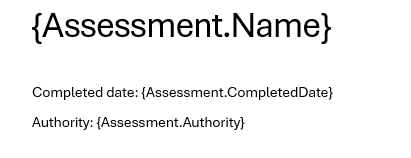
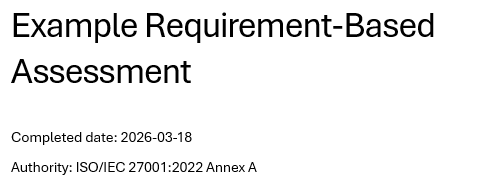
For example, {Assessment.Name} will populate the report with the name of the assessment where the tag is placed, similar to Pixel Perfect tags.
Loops
Loop through arrays with #.
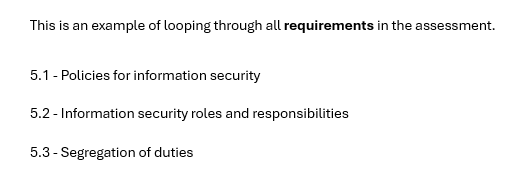
This is an example of looping through all requirements in the assessment.
{#Assessment.Requirements}
{IdRef} - {Name}
{/}
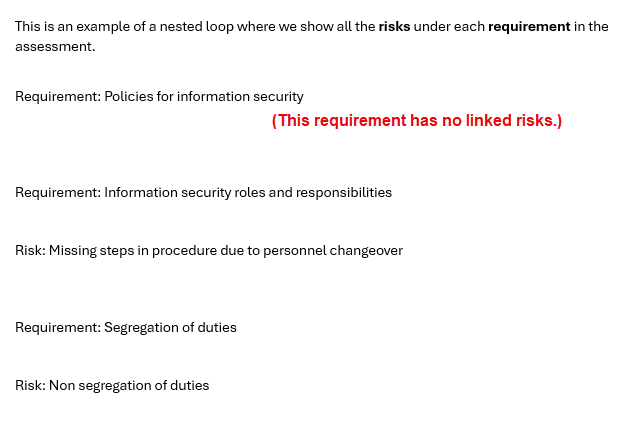
This is an example of a nested loop where we show all the risks under each requirement in the assessment.
{#Assessment.Requirements}
Requirement: {Name}

{#Risks}
Risk: {Name}
{/}

{/}
Collecting nested data
You can display all the data of a certain type.
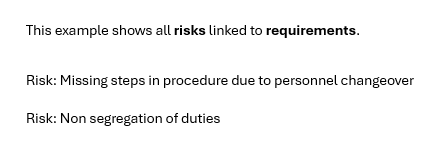
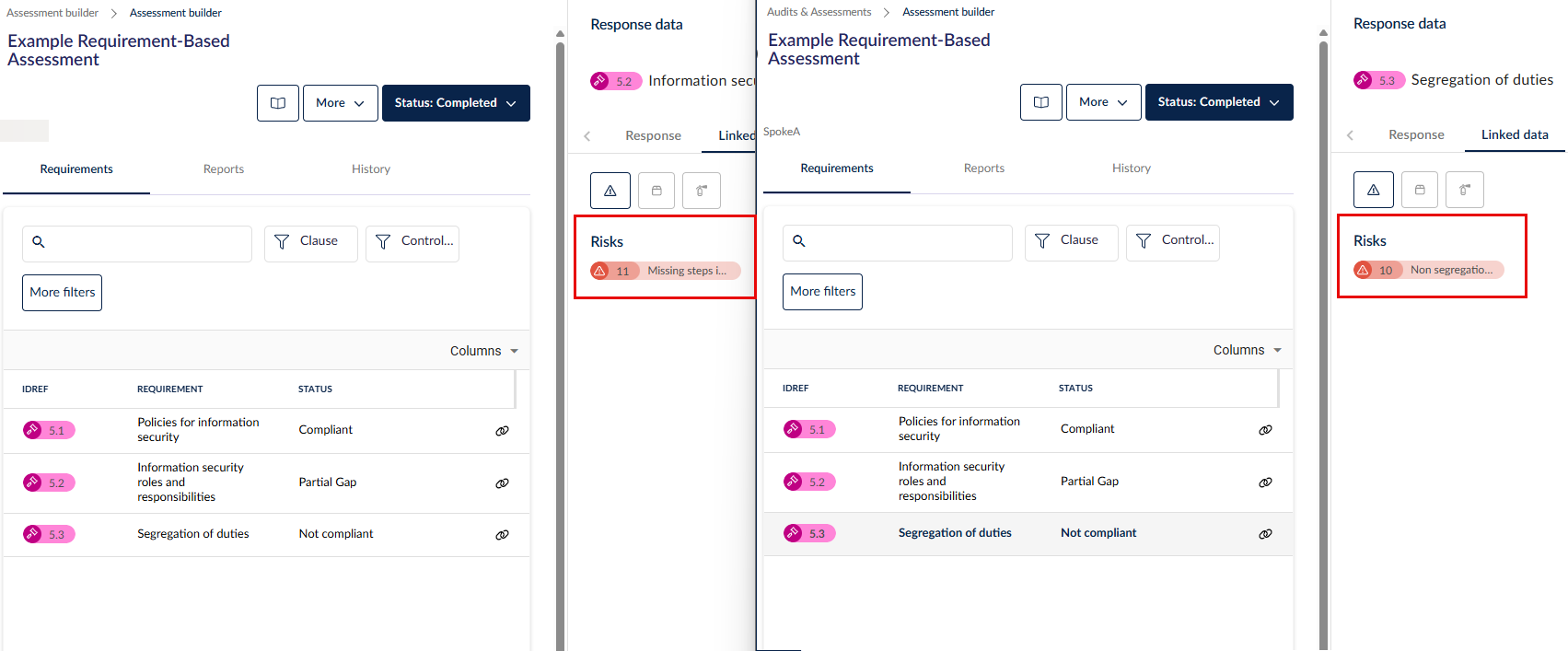
This example shows all risks linked to requirements.
{#Assessment.Requirements | collect:'Risks'}
Risk: {Name}
{/}
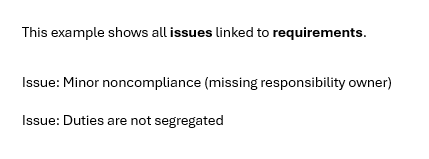
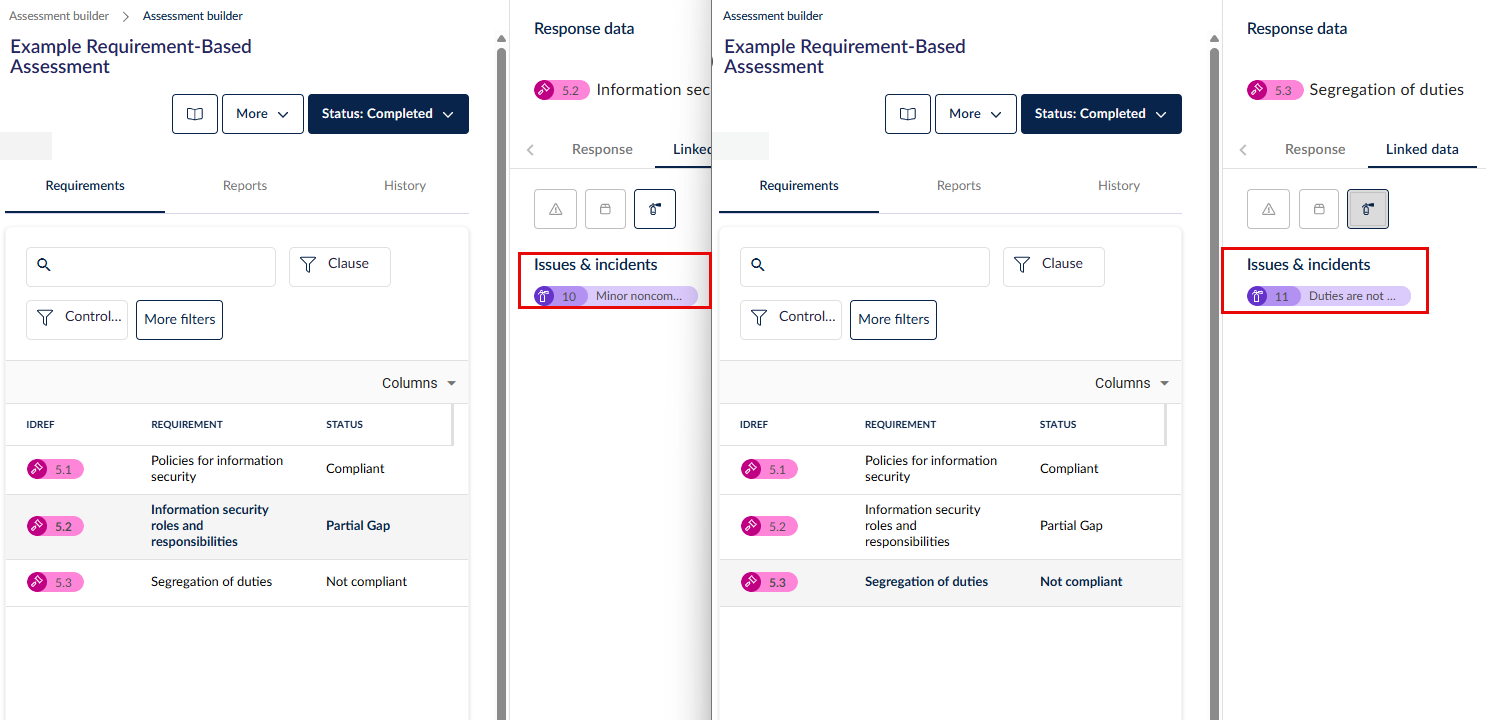
This example shows all issues linked to requirements.
{#Assessment.Requirements | collect:'Issues&incidents'}
Issue: {Name}
{/}
Tables with placeholders
You can define tables which will dynamically populate depending on the parameters you define.
{#loop}must be on its own row{/}closes the loop
This is an example table for requirements and responses to the field Status. If your RBA has 30 requirements, it will loop for 30 rows in the final report.
| Requirement | Domain | Status |
|---|---|---|
|
{#Assessment.Requirements} {IdRef} |
{RequirementDomainName} |
{Responses.Status} {/} |
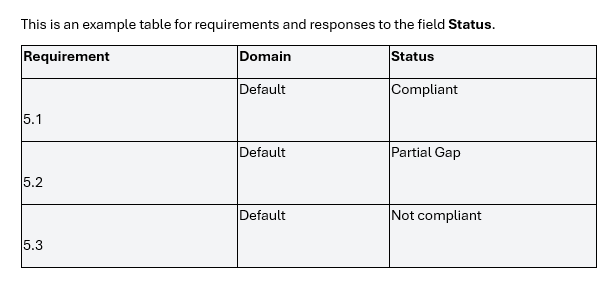
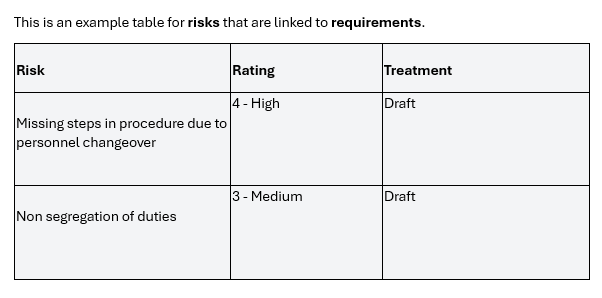
This is an example table for risks that are linked to requirements. It will loop through all the risks that are linked.
| Risk | Rating | Treatment |
|---|---|---|
|
{#Assessment.Requirements | collect:‘Risks’} {Name}
|
{RiskRating} |
{TreatmentStatus} {/} |
Aggregation placeholders
You can aggregate values e.g. number of risks.
This is an example of displaying the number of requirements in an assessment.
Total Requirements: {Assessment.Requirements | count}

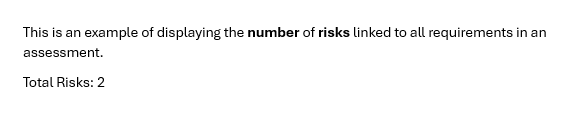
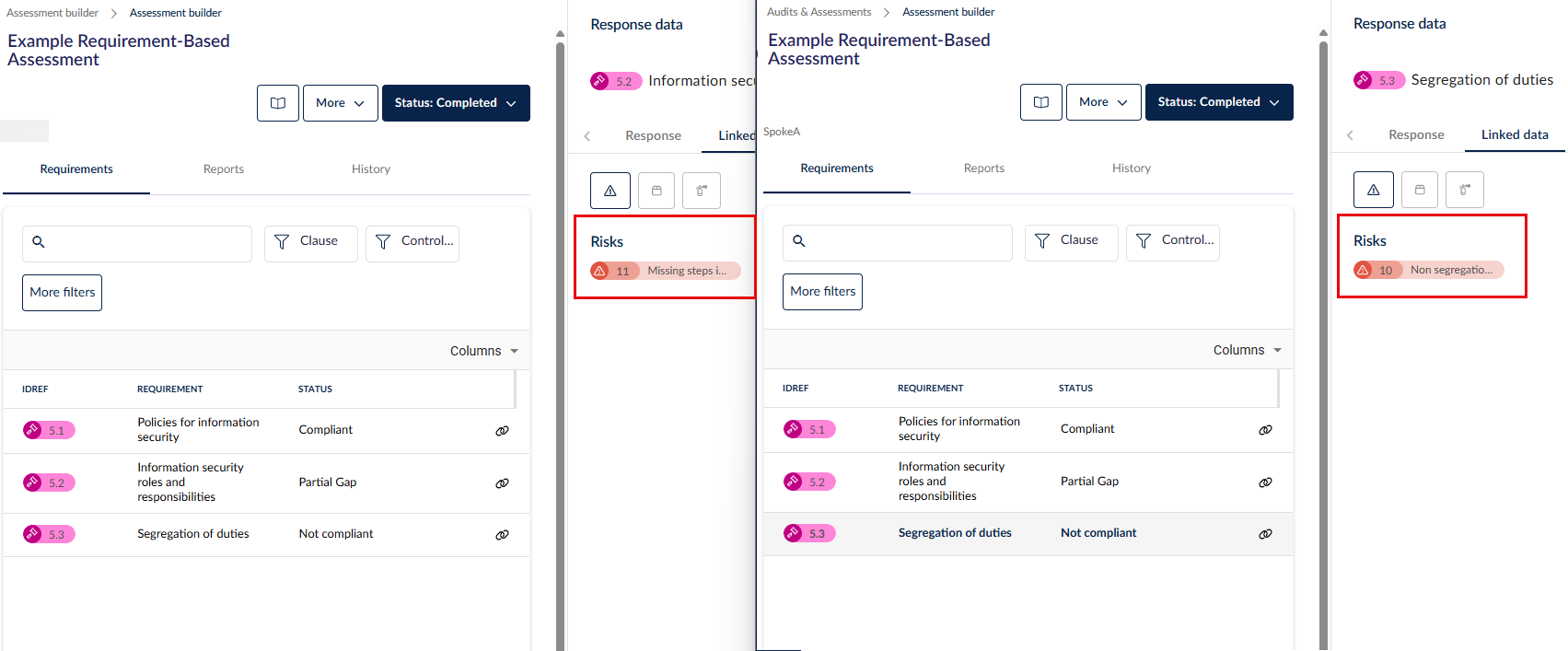
This is an example of displaying the number of risks linked to all requirements in an assessment.
Total Risks: {Assessment.Requirements | count:'Risks'}
This is an example of the same but using collect.
Total Risks: {Assessment.Requirements | collect:'Risks' | count}
Bar charts
You can generate a bar chart using aggregated counts or filtered data e.g. number of risks by requirement.
Filtering & excluding data
You can apply filters to aggregation placeholders so that calculated values only include results that meet the given criteria e.g. number of controls that are implemented. Filters can be applied to aggregation placeholders, risks, issues, and other registers.
| Filter | Purpose |
|---|---|
count |
Count items in an array |
collect |
Flatten nested arrays |
distinctBy |
Remove duplicates |
where |
Filter data |
sortBy |
Sort items |
sortByPriority |
Sort by priority levels |
groupBy |
Group items by a field |
Filters support common conditions (e.g. equals, not equals, greater than, less than).
Multiple filters can be combined.
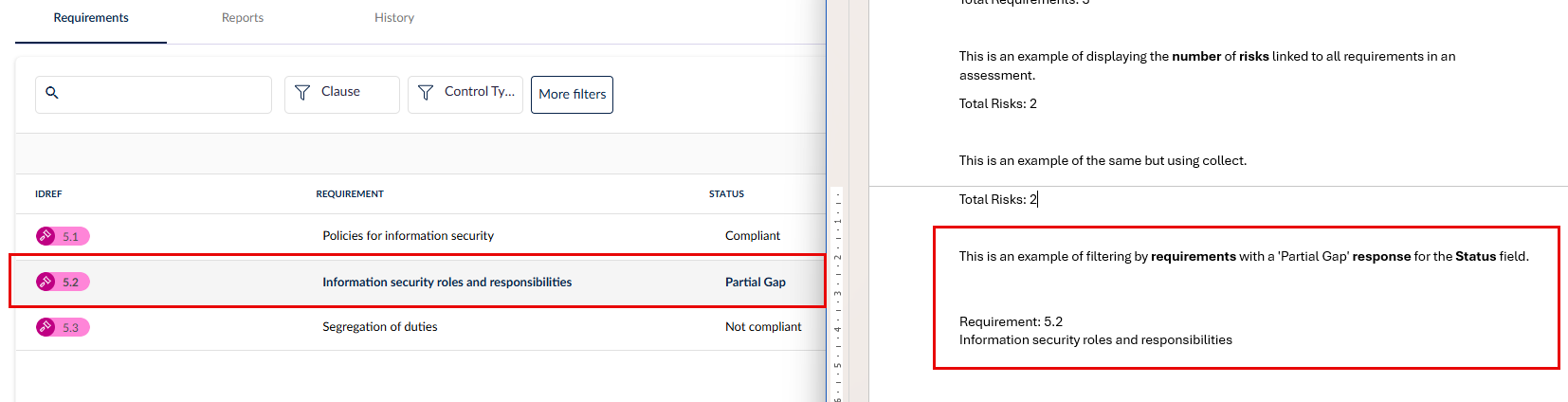
This is an example of filtering by requirements with a 'Partial Gap' response.
{#Assessment.Requirements | where:"Responses.Status == 'Partial Gap'"}

Requirement: {IdRef}
{Name}

{/}
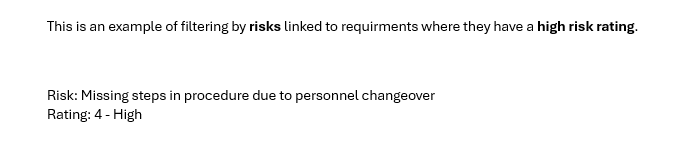
This is an example of filtering by risks linked to requirments where they have a high risk rating.
{#Assessment.Requirements | collect:'Risks' | where:"RiskRating == '4 - High'"}

Risk: {Name}
Rating: {RiskRating}

{/}
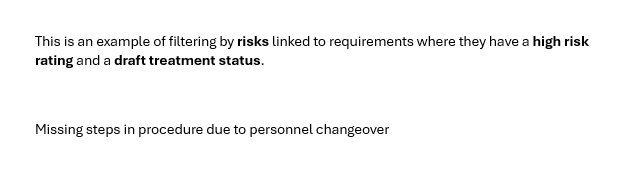
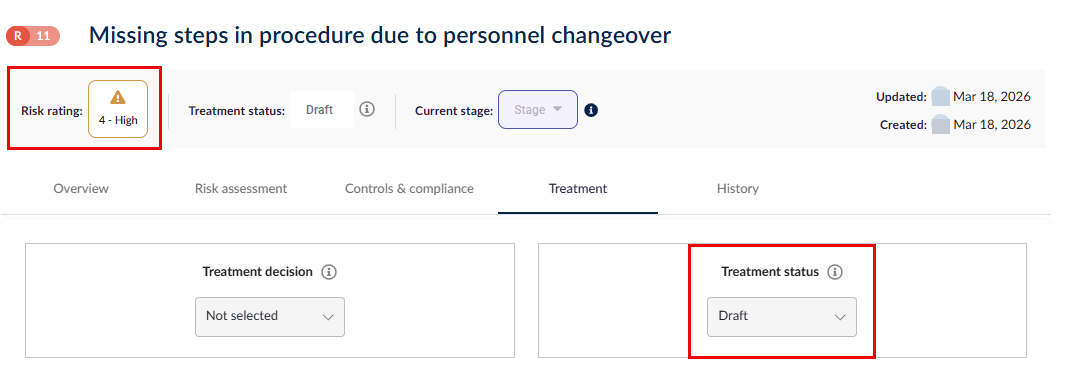
This is an example of filtering by risks linked to requirements where they have a high risk rating and a draft treatment status.
{#Assessment.Requirements | collect:'Risks'
  | where:"RiskRating == '4 - High' && TreatmentStatus == 'Draft'"}

{Name}

{/}
Grouping data
You can group records by a selected field. Grouped data appears as distinct sections in the generated report. Grouping can be applied to linked data such as risks, issues, and other registers.
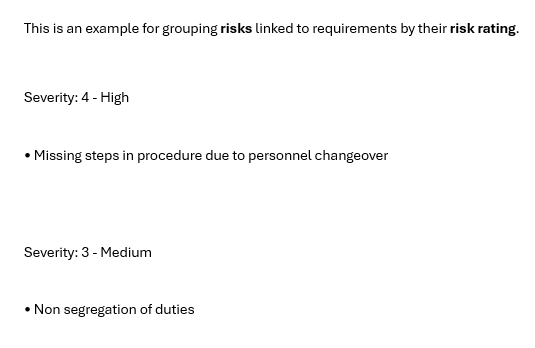
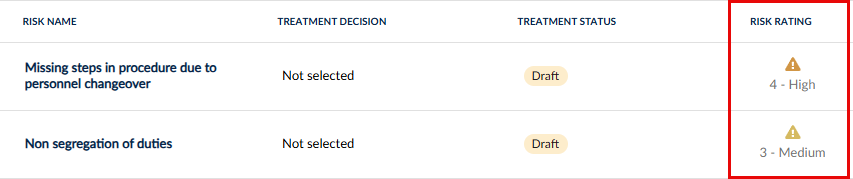
This is an example for grouping risks linked to requirements by their risk rating.
{#Assessment.Requirements | collect:'Risks' | groupBy:'RiskRating'}

Severity: {key}

{#items}
• {Name}
{/items}

{/}
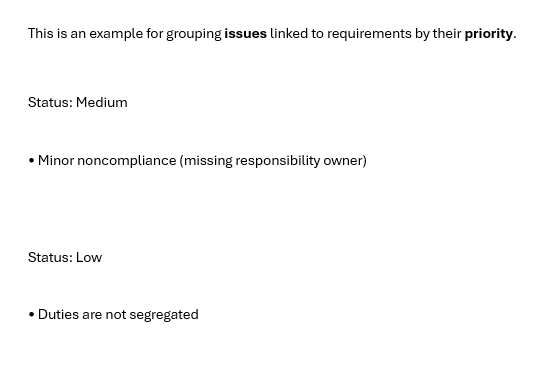
This is an example for grouping issues linked to requirements by their priority.
{#Assessment.Requirements | collect:'Issues&incidents' | groupBy:'Priority'}

Status: {key}

{#items}
• {Name}
{/items}

{/}

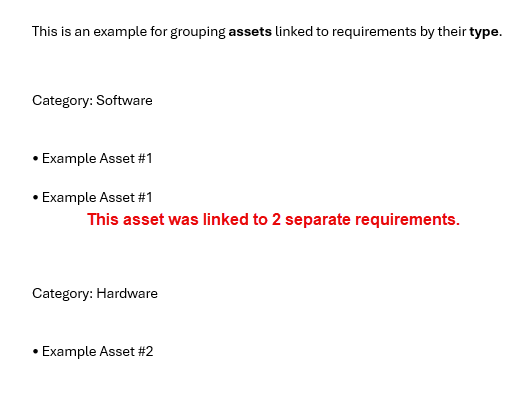
This is an example for grouping assets linked to requirements by their type.
{#Assessment.Requirements | collect:'Assets' | groupBy:'Type'}

Category: {key}

{#items}
• {Name}
{/items}

{/}
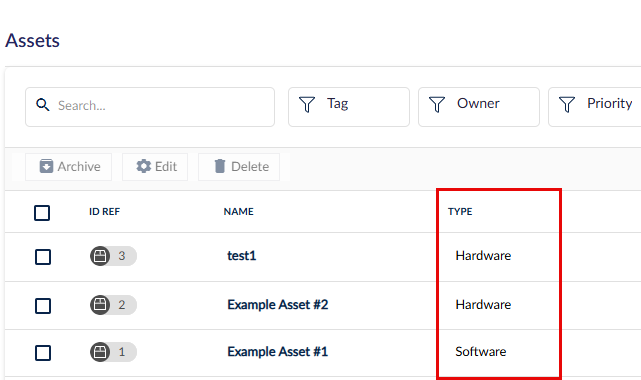
Grouping works in conjunction with filtering and aggregation functions.
Configuring ordering rules
The system supports sorting by one or more fields. Sorting can be applied to linked data such as risks, issues, and other registers. Sorting supports ascending and descending order, and custom sort orders for categorical values.
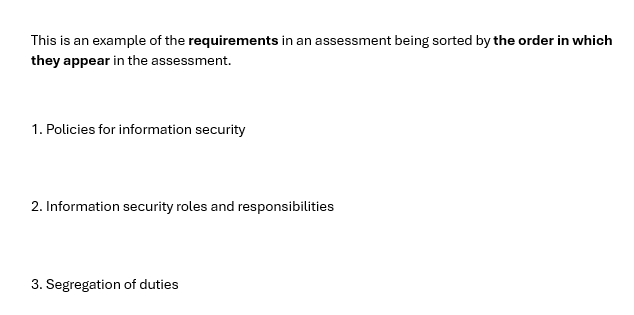
This is an example of the requirements in an assessment being sorted by the order in which they appear in the assessment.
{#Assessment.Requirements | sortBy:'Order asc'}

{Order}. {Name}

{/}
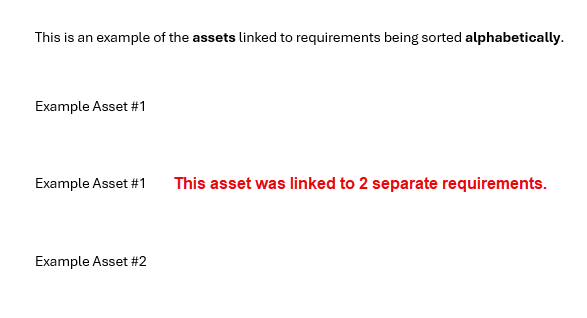
This is an example of the assets linked to requirements being sorted alphabetically.
{#Assessment.Requirements | collect:'Assets' | sortBy:'Name asc'}

{Name}

{/}
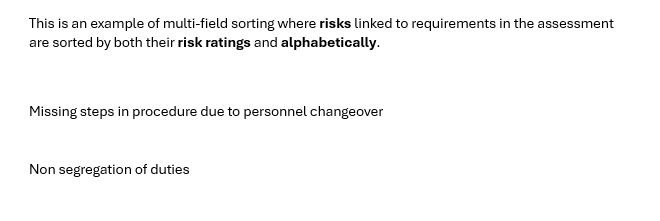
This is an example of multi-field sorting where risks linked to requirements in the assessment are sorted by both their risk ratings and alphabetically.
{#Assessment.Requirements | collect:'Risks'
  | sortBy:'RiskRating desc, Name asc'}

{Name}
{/}
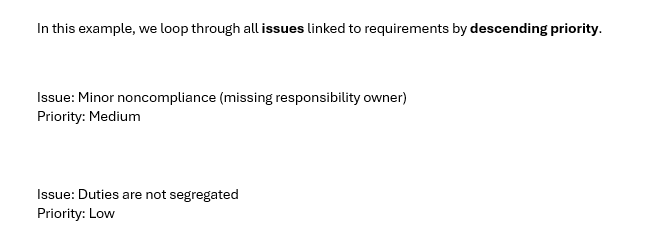
The custom filter sortByPriority will sort linked issues by Immediate, High, Medium and Low. In this example, we loop through all issues linked to requirements by descending priority.
{#Assessment.Requirements
   | collect:'Issues&incidents'
   | sortByPriority:'desc'}

Issue: {Name}
Priority: {Priority}

{/}
Sorting works independently and in conjunction with filtering and grouping.
Include provisions and controls linked to each question
For authority-linked assessments, each question exposes a LinkedProvisions array containing:
ReferenceId — the provision reference (e.g. 4.1.1)
Name — the provision name
Description — the provision description
For control set-linked assessments, each question exposes a LinkedControls array containing:
ReferenceId: the control reference (e.g. GC-1)
Name: the control name
Description: the control description
Template syntax — use within a {#Assessment.Questions} block:
{#Assessment.Questions}
{#LinkedProvisions}
Ref: {ReferenceId}
Provision: {Name}
{/LinkedProvisions}
{#LinkedControls}
Ref: {ReferenceId}
Control: {Name}
{/LinkedControls}
{/Assessment.Questions}
When no links exist:
If a question has no linked provisions or controls, the loop outputs nothing — the section is simply skipped in the generated report.
Generating reports using the template
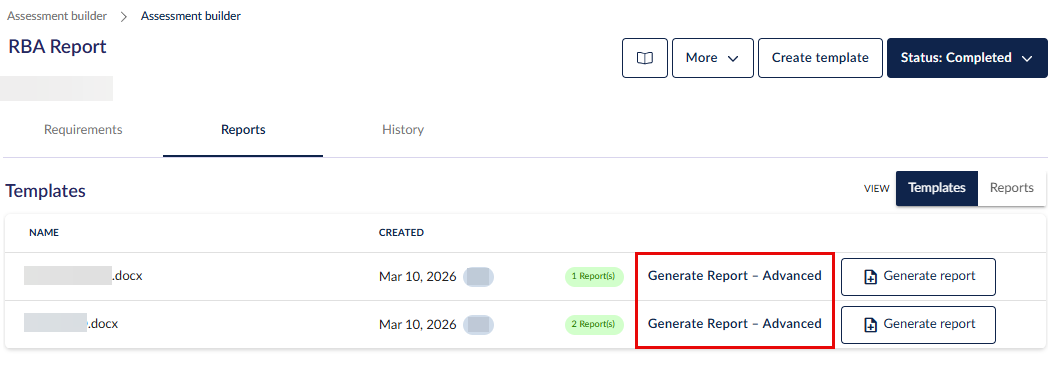
Once you are happy with the advanced tags, upload the report template and click on Generate report - advanced to generate and download a new report using the template.
To learn more about the original assessment report generator, head here.
Example data - QBA
Example top level structure
"Assessment":{
  "Id": 101,
  "AssessmentName": "Vendor Security Assessment 2024",
  "Status": "Active",
  "Objective": "Evaluate vendor security posture",
  "AssessmentDescription": "Annual security review",
  "DueDate": "2024-12-31",
  "DatePublished": "2024-01-15",
  "CreatedDate": "2024-01-10",
  "ClosedDate": "",
  "ClosedReason": "",
  "DateCompleted": "2024-06-01",
  "AssessmentVersion": "2",

  "ResponseUser": "Jane Smith",           // Full name of the user who submitted the response
  "ResponseSummary": "All controls met",  // Internal summary text from the response

  "NameOfRespondent": "Acme Corp",        // TenantVendor name
  "Authority": "ISO 27001",              // Authority framework name (if linked)
  "ControlSet": "Security Controls v2",  // Policy/control set name (if linked)

  "TotalQuestions": 12,   // Count of actual questions + one per looped/parent-child group
  "TotalDomains": 3,

  "AssessmentAttachment": [              // All evidence document names across the assessment
    "evidence_policy.pdf",
    "audit_report.docx"
  ],

  "Domains": [...],                      // See Domains section
  "Questions": [...],                    // See Questions section
  "Risks": [...],                        // See Risks (top-level summary) section
  "Assets": [...],                       // See Assets section
  "CustomFieldDefinitions": [...],       // See Custom Field Definitions section

  // Dynamic issue register keys — one per register name containing question-linked + scope issues
  "Incident Register": [...],
  "Risk Register": [...],

  "AssessmentLinkedData": [...],         // See AssessmentLinkedData section
  "Projects": [...],                     // See Projects section

  "AssessmentResultsBarChart": {...},    // See Chart section
  "ResponseSummaryTable": {...}          // See Response Summary Table section
}
Example domain structure (QBA)
"Domains": [
  {
    "Id": 10,
    "Name": "Access Control",
    "Description": "Controls related to system access",
    "IntroductionText": "Please answer all access control questions.",
    "Order": 1,
    "TotalQuestions": 5   // Includes synthetic looped/parent-child headers
  }
]
Example questions structure
Regular question
{
  "Id": 201,
  "IdRef": "1.1",
  "Name": "Do you have an access control policy?",
  "Title": "1. Do you have an access control policy?",  // Plain string for standard questions
  "Description": "Describe your access control policy in detail.",
  "DomainId": 10,
  "DomainName": "Access Control",
  "DomainOrder": 1,
  "GroupId": 0,
  "GroupName": "",
  "Order": "1",
  "Suborder": "",
  "QuestionOrder": "1",
  "QuestionType": "Yes / No",
  "Weighting": 3.0,
  "ParentQuestionId": 0,
  "ParentQuestionName": "",
  "QuestionGroupResponseId": 0,
  "QuestionGroupResponseName": "",
  "SkipLogicApplied": false,
  "DocumentEvidenceMandatory": "Yes",
  "DocumentEvidenceUploaded": "Yes",
  "IsMandatory": true,

  "Answer": {
    "Status": "SUBMITTED",
    "ComplianceStatus": "Compliant",
    "RiskStatus": "NoRisk",
    "Score": "3",
    "ReviewerComment": "Verified against policy document.",
    "Explanation": "We maintain a comprehensive access control policy reviewed annually.",
    "Responses": [
      {
        "Response": "Yes",
        "RiskStatus": "",        // Populated for Risk assessment method only
        "Rating": "",            // Populated for Risk assessment method only
        "WeightedScore": "9",   // Populated for Weighted assessment method only (rank × weighting)
        "Score": "3"
      }
    ]
  },

  "EvidenceAttachments": ["access_policy_v3.pdf"],   // Uploaded by respondent
  "ReviewAttachments": ["reviewer_notes.docx"],       // Attached during review
  "ReferenceAttachments": ["iso27001_ref.pdf"],       // Attached to the question definition

  "Risks": [...],   // Full risk detail — see Risks (per-question) section

  // Dynamic issue register keys — only present if issues are linked to this question
  "Incident Register": [
    { "Id": 500, "IdRef": "INC-001", "Name": "Login Failure Spike", "Description": "..." }
  ]
}
Parent-child question
{
  "Id": 205,
  "IdRef": "2a.1",
  "Name": "Sub-question: Who is responsible?",
  // Title is \n-separated: "Order+Suborder. GroupName\nChildName"
  "Title": "2a. Governance Group\nSub-question: Who is responsible?",
  "GroupId": 30,
  "GroupName": "Governance Group",
  "Order": "2",
  "Suborder": "a",
  "QuestionOrder": "2a",
  "QuestionType": "Short Text",
  "ParentQuestionId": 204,
  "ParentQuestionName": "Parent: Governance overview",
  "QuestionGroupResponseId": 0,
  "QuestionGroupResponseName": "",
  "IsGroupResponseHeader": false,
  // ... same Answer, attachments, Risks fields as regular question
}
Looped question - synthetic header (IsGroupResponseHeader: true)
One synthetic header is inserted per loop iteration. It has Id: 0 and IsGroupResponseHeader: true.
{
  "Id": 0,
  "IdRef": "3A",
  "Name": "Supplier Loop",
  "Title": ["3A. Supplier Loop"],   // Single-element list for looped headers
  "Description": "Repeat for each supplier",
  "DomainId": 10,
  "DomainName": "Access Control",
  "DomainOrder": 1,
  "GroupId": 40,
  "GroupName": "Supplier Loop",
  "Order": "3",
  "Suborder": "0",
  "QuestionType": "Looped",
  "Weighting": 0.0,
  "ParentQuestionId": 0,
  "ParentQuestionName": "",
  "QuestionGroupResponseId": 88,
  "QuestionGroupResponseName": "Supplier A",   // "Default" if response is blank
  "IsGroupResponseHeader": true,

  "Answer": {
    "Status": "",
    "Compliance": "NotSet",
    "RiskStatus": "",
    "Score": "",
    "ReviewerComment": "",
    "Response": "Supplier A",
    "Explanation": ""
  },

  "EvidenceAttachments": ["supplier_a_cert.pdf"],   // Group-response-level documents
  "Risks": []
}
Looped child question
{
  "Id": 210,
  "IdRef": "3.A.1",
  "Name": "Does the supplier hold ISO certification?",
  "Title": ["A.1. Does the supplier hold ISO certification?"],  // Single-element list
  "GroupId": 40,
  "GroupName": "Supplier Loop",
  "Order": "3",
  "Suborder": "",
  "QuestionType": "Yes / No",
  "QuestionGroupResponseId": 88,
  "QuestionGroupResponseName": "Supplier A",
  // ... same Answer, attachments, Risks fields as regular question
}
Risks (top-level summary)
Top-level Risks is a flat deduplicated list covering both question-linked and scope-linked risks.
"Risks": [
  {
    "Id": 300,
    "IdRef": "RSK-001",
    "Name": "Unauthorised Access",
    "Description": "Risk of unauthorised system access"
  }
]
Risks (per question, full detail)
Questions[n].Risks contains full risk detail including treatment plans and custom fields.
"Risks": [
  {
    "Id": 300,
    "IdRef": "RSK-001",
    "Name": "Unauthorised Access",
    "Description": "Risk of unauthorised system access",
    "Status": "Open",
    "RiskRating": "High",
    "InherentRating": "Critical",
    "ResidualRating": "Medium",
    "Owner": "John Doe",
    "DateIdentified": "15 Jan 2024",
    "DateReviewed": "01 Mar 2024",
    "ReviewDate": "01 Jun 2024",
    "RiskTreatmentPlan": "RTP1 (Status: New | Due Date: )",
    "TreatmentPlans": [
      {
        "Id": 400,
        "Name": "Implement MFA",
        "Status": "In Progress",
        "DueDate": "30 Jun 2024",
        "Owners": ["Jane Smith"]
      }
    ],
    // Dynamic custom field keys (spaces removed from field names)
    "RiskRating": "High",
    "BusinessImpact": "Financial"
  }
]
Assets
"Assets": [
  {
    "Id": 600,
    "Name": "Core Banking System",
    "Description": "Primary banking application",
    // Dynamic custom field keys (spaces removed from field names)
    "AssetType": "Software",
    "Criticality": "High"
  }
]
Custom field definitions
"CustomFieldDefinitions": [
  {
    "Name": "BusinessImpact",   // Sanitized (spaces removed)
    "Label": "Business Impact",
    "Options": ["Financial", "Operational", "Reputational"]
  }
]
AssessmentLinkedData
Flat ordered list of all entities linked to the assessment (respondent, authority, control set, scope risks, scope register items).
"AssessmentLinkedData": [
  { "Index": 1, "EntityTypeLabel": "Respondent",   "EntityName": "Acme Corp" },
  { "Index": 2, "EntityTypeLabel": "Authority",    "EntityName": "ISO 27001" },
  { "Index": 3, "EntityTypeLabel": "Control Set",  "EntityName": "Security Controls v2" },
  { "Index": 4, "EntityTypeLabel": "Risk",         "EntityName": "Unauthorised Access" },
  { "Index": 5, "EntityTypeLabel": "Incident",     "EntityName": "Login Failure Spike" }
]
AssessmentResultsBarChart
Shape varies by assessmentMethod.
Weighted
"AssessmentResultsBarChart": {
  "assessmentMethod": "Weighted",
  "categories": ["Access Control", "Governance", "Data Protection"],   // Domain names (reversed)
  "series": [
    {
      "title": "Actual Score",
      "key": "TotalScore",
      "color": "#FF6384",
      "data": [12.0, 8.5, 10.0]   // One value per domain; averaged if WithinDomain = Average
    },
    {
      "title": "Maximum Possible Score",
      "key": "ScoreDifference",
      "color": "#36A2EB",
      "data": [3.0, 6.5, 5.0]     // maxPossibleScore - totalScore per domain (stacked remainder)
    }
  ],
  "options": {
    "valueAxis": {
      "min": 0,
      "max": 20,    // Rounded up to a nice tick boundary (max 5 gridlines)
      "tick": 4
    }
  }
}
Risk-rated
"AssessmentResultsBarChart": {
  "assessmentMethod": "Risk",
  "categories": ["Access Control", "Governance"],
  "series": [
    { "title": "No Risk",   "key": "NoRisk",   "color": "", "data": [3.0, 2.0] },
    { "title": "Low",       "key": "Low",       "color": "", "data": [1.0, 0.0] },
    { "title": "Medium",    "key": "Medium",    "color": "", "data": [0.0, 1.0] },
    { "title": "High",      "key": "High",      "color": "", "data": [1.0, 0.0] },
    { "title": "Very High", "key": "VeryHigh",  "color": "", "data": [0.0, 0.0] }
  ],
  "options": {
    "valueAxis": { "min": 0, "max": 5, "tick": 1 }
  }
}
ResponseSummaryTable
"ResponseSummaryTable": {
  "header": [
    "Domain Name",
    "Total Questions",
    "Yes",          // Distinct selected answer option values across the assessment
    "No",
    "N/A"
  ],
  "data": [
    [
      // Domain name cell — bold, shaded background
      { "text": "<p><strong>Access Control</strong></p>", "style": { "shade": "d9d9d9" } },

      // Total questions — includes synthetic looped/parent-child headers
      { "text": "5" },

      // One cell per answer option value
      { "text": "3" },
      { "text": "1" },
      { "text": "0" }
    ]
  ]
}
Notes
- Date formats: All dates use
yyyy-MM-dd. Risk/Issue dates inside linked data usedd MMM yyyy. - Title variants:
Titleis a plain string for regular questions ("1. Question Name"), a\\nseparated string for parent-child questions ("1a. Group Name\\nChild Question Name"), and a single-element list for looped questions (["1A. Loop Group Name"]). - Synthetic looped headers: One extra entry per loop iteration (
IsGroupResponseHeader: true,Id: 0) is injected intoQuestionsto act as the group response header row. These match the legacy resolver’s synthetic parent behaviour. - Answer.Responses: Always a list — one entry per selected answer option. For text questions it contains one entry with the text value. For unanswered questions the list is empty.
- Dynamic issue register keys: Issues at both assessment level and per-question level are grouped by their register name (e.g.
"Incident Register","Risk Register"). The actual key names depend on the tenant’s configuration. - Risks at two levels:
Risksappears at the top level (summary list) and nested inside eachQuestions[n].Risks(full detail per question). Scope-linked risks are merged into the top-level summary only. - Field name sanitization: Custom field names used as JSON keys have spaces removed (e.g.
"Risk Rating"→"RiskRating"). - Assessment method variants:
Answer.Responses[n].WeightedScoreis only populated forWeightedassessments.Answer.Responses[n].RiskStatus/Ratingare only populated forRiskassessments. - Chart:
AssessmentResultsBarChart.assessmentMethoddrives which series appear —"Weighted","Risk", or"PreferredAnswer".
Example data - RBA
This is the shape of the assessment data dictionary built by RequirementBasedReportDataBuilder.ShapeAssessment(). This object is what the VM template operates on via source references.
"Assessment":{
  // ── Scalar assessment fields ──
  "Id": 12345,
  "Name": "SOC2 Compliance Review 2025",
  "Status": "InProgress",
  "Objective": "Evaluate compliance posture",
  "Description": "Annual SOC2 assessment for cloud services",
  "DueDate": "2025-06-30",
  "PublishedDate": "2025-01-15",
  "CreatedDate": "2025-01-10",
  "ClosedDate": "",
  "ClosedReason": "",
  "CompletedDate": "",
  "Version": "1",
  "Type": "Authority",                     // "Authority" or "Policy"
  "ResponseUser": "John Smith, Jane Doe",   // comma-separated responder names
  "ResponseSummary": "Initial review completed with identified gaps",
  "Respondent": "Acme Corp",               // only present if TenantVendor exists
  "Authority": "SOC2 Type II",             // only present if AuthorityId exists
  "Policy": "",                            // only present if PolicyId exists

  // ── Domains ──
  "Domains": [
    {
      "Id": 1,
      "Name": "Security",
      "Description": "Security controls and procedures",
      "IntroductionText": "This domain covers...",
      "Order": 1
    },
    {
      "Id": 2,
      "Name": "Availability",
      "Description": "System availability requirements",
      "IntroductionText": "",
      "Order": 2
    }
  ],

  // ── Requirements ──
  "Requirements": [
    {
      "Id": 101,
      "DomainId": 1,
      "RequirementDomainName": "Security",
      "Domain": "Security",                       // same as RequirementDomainName
      "Type": "provision",                         // "provision" or "control"
      "IdRef": "CC6.1",
      "Name": "Logical and Physical Access Controls",
      "Description": "The entity implements logical access security...",
      "Order": 1,

      // Responses - custom field values keyed by sanitized field name
      "Responses": {
        "Status": "Gap",                           // dropdown field
        "Risk": "High",                            // dropdown field
        "GapTrustedResponse": "Not Implemented",   // dropdown field
        "Comments": "<p>Needs remediation</p>"            // free text field
      },

      // Custom fields flattened at requirement level (spaces removed from names)
      "ControlEffectiveness": "Effective",
      "ImplementationStatus": "Planned",

      "ReferenceAttachments": ["policy-doc.pdf"],  // file names
      "EvidenceAttachments": ["evidence-screenshot.png"],
      "IsEvidenceMandatory": true,

      // ── Risks linked under each requirement ──
      "Risks": [
        {
          "Id": 501,
          "IdRef": "R 42",                         // "R {TenantEntityUniqueId}"
          "Name": "Unauthorized Access",
          "Description": "Risk of unauthorized system access",
          "CommonCause": "Weak authentication mechanisms",
          "LikelyImpact": "Data breach and regulatory fines",
          "RiskRating": "High",
          "RiskRatingColor": "#FF0000",
          "RiskRatingOrder": 4,                    // rating order used for sorting
          "CurrentRiskRating": "High",
          "PlannedRiskRating": "Medium",
          "ResidualRiskRating": "Low",
          "TreatmentStatus": "InProgress",         // enum string
          "TreatmentDecision": "Mitigate",
          "Owners": "Alice Johnson, Bob Wilson",   // comma-separated
          "AccessMembers": "Team Alpha",           // comma-separated
          "Tags": "critical, access-control",      // comma-separated
          "RiskTreatmentPlan": "Implement MFA (InProgress, due 2025-03-01)",  // formatted summary for standard template

          "RiskTreatmentPlanDetails": [            // full details per plan
            {
              "Name": "Implement MFA",
              "Description": "Deploy multi-factor authentication",
              "Status": "InProgress",
              "DueDate": "01 Mar 2025",            // dd MMM yyyy format
              "CompletionDate": ""
            }
          ],

          // Custom fields from ThirdPartyControl (sanitized names, spaces removed)
          "Likelihood": "Likely",                  // dropdown custom attribute
          "Impact": "Major",                       // dropdown custom attribute
          "MitigationNotes": "MFA rollout Q2",     // free text custom field

          "RiskAssessment": [                      // ordered by AssessmentDate desc
            {
              "Id": 801,
              "Name": "Q1 2025 Review",            // Title
              "AssessmentDate": "2025-03-15",
              "Likelihood": "Likely",              // dropdown custom attributes
              "Impact": "Major"
            }
          ]
        }
      ],

      // ── Issues grouped by ntity register name (Assets, Issues&Insidents)
      "Issues&incidents": [                                // key = entity register name
        {
          "Id": 601,
          "IdRef": "I 15",                         // "I {EntityRegisterItemId}"
          "Name": "Missing encryption on storage",
          "Description": "Data at rest is not encrypted",
          "Status": "Open",
          "Stage": "Investigation",                // WorkflowStage name or "Unassigned"
          "Priority": "High",                      // display name
          "ReportedBy": "Alice Johnson",
          "RecordedDate": "15 Jan 2025",           // dd MMM yyyy
          "DueDate": "28 Feb 2025",
          "Owners": "Bob Wilson",
          "Tags": "encryption, storage",

          // Custom fields (sanitized names)
          "Severity": "Critical",                  // dropdown custom attribute
          "RootCause": "Configuration oversight",  // free text custom field

          "IssueActions": "Deploy encryption (InProgress, due 01 Mar 2025)", // concatenated summary

          "IssueActionsDetails": [                 // full details per action
            {
              "Id": 701,
              "IdRef": "A-001",
              "Title": "Deploy encryption",
              "Description": "Enable AES-256 encryption on all storage",
              "Status": "InProgress",
              "Assignee": "Charlie Davis",
              "DueDate": "01 Mar 2025",
              "CompletedDate": ""
            }
          ]
        }
      ],

      // ── Assets linked to this requirement ──
      "Assets": [
        {
          "Id": 301,
          "Title": "Cloud Database",
          "ShortDescription": "Production database",
          "Description": "Primary cloud-hosted database",
          "AssetType": "Infrastructure"            // custom field
        }
      ]
    }
  ],

  // ── Top-level Risks (assessment-scope summary only) ──
  "Risks": [
    {
      "Id": 501,
      "IdRef": "R 42",
      "Name": "Unauthorized Access",
      "Description": "Risk of unauthorized system access"
    },
    {
      "Id": 502,
      "IdRef": "R 43",
      "Name": "Data Loss",
      "Description": "Risk of data loss due to system failure"
    }
  ],

  // ── Top-level Assets (assessment-scope with custom fields) ──
  "Assets": [
    {
      "Id": 301,
      "Title": "Cloud Database",
      "ShortDescription": "Production database",
      "Description": "Primary cloud-hosted database",
      "AssetType": "Infrastructure",               // custom field from ThirdPartyAttributes
      "Criticality": "High"                        // custom field from ThirdPartyAttributes
    },
    {
      "Id": 302,
      "Title": "API Gateway",
      "ShortDescription": "External API endpoint",
      "Description": "Customer-facing API gateway",
      "AssetType": "Application",
      "Criticality": "Medium"
    }
  ],

  // ── CustomFieldDefinitions (used by categoriesSource for resolving all possible values) ──
  "CustomFieldDefinitions": {
    "Assessment": {                                // assessment response dropdown fields
      "Status": [                                  // sanitized field name -> ordered options
        { "name": "Gap", "order": 1 },
        { "name": "Partial Gap", "order": 2 },
        { "name": "No Gap", "order": 3 },
        { "name": "Out Of Scope", "order": 4 }
      ],
      "Risk": [
        { "name": "High", "order": 1 },
        { "name": "Medium", "order": 2 },
        { "name": "Low", "order": 3 }
      ]
    },
    "Control": {                                   // control/policy custom field definitions
      "ControlEffectiveness": [
        { "name": "Effective", "order": 1 },
        { "name": "Partially Effective", "order": 2 },
        { "name": "Ineffective", "order": 3 }
      ]
    },
    "Risk": {                                      // risk custom field definitions
      "RiskRating": [                              // includes dedicated RiskRating options
        { "name": "Very High", "order": 1 },
        { "name": "High", "order": 2 },
        { "name": "Medium", "order": 3 },
        { "name": "Low", "order": 4 },
        { "name": "Very Low", "order": 5 }
      ],
      "Likelihood": [
        { "name": "Almost Certain", "order": 1 },
        { "name": "Likely", "order": 2 },
        { "name": "Possible", "order": 3 },
        { "name": "Unlikely", "order": 4 },
        { "name": "Rare", "order": 5 }
      ]
    },
    "Issues": {                                    // issue custom field definitions
      "Severity": [
        { "name": "Critical", "order": 1 },
        { "name": "High", "order": 2 },
        { "name": "Medium", "order": 3 },
        { "name": "Low", "order": 4 }
      ]
    }
  },

  // ── Projects ──
  "Projects": [
    {
      "Id": 901,
      "Name": "SOC2 Remediation Project",
      "Tasks": [
        {
          "Id": 1001,
          "Name": "Implement access controls",
          "Description": "Deploy RBAC across all systems",
          "Status": "InProgress",
          "Assignees": "Alice Johnson, Bob Wilson", // comma-separated
          "DueDate": "2025-04-15"                   // yyyy-MM-dd
        },
        {
          "Id": 1002,
          "Name": "Update security policies",
          "Description": "Review and update all security documentation",
          "Status": "NotStarted",
          "Assignees": "Charlie Davis",
          "DueDate": "2025-05-01"
        }
      ]
    }
  ],

  // ── Top-level issues grouped by register name (assessment-scope, summary only) ──
  "Findings": [
    {
      "Id": 601,
      "IdRef": "I 15",
      "Name": "Missing encryption on storage",
      "Description": "Data at rest is not encrypted"
    }
  ],
  "Incidents": [
    {
      "Id": 602,
      "IdRef": "I 16",
      "Name": "Unauthorized login attempt",
      "Description": "Multiple failed login attempts detected"
    }
  ]
}
Notes
- Field name sanitization: All custom field names have spaces removed (e.g. “Risk Rating” becomes
"RiskRating"). - Date formats: Assessment-level dates use
yyyy-MM-dd. Risk/Issue dates usedd MMM yyyy. - Dynamic keys: Issue register names and custom fields create dynamic keys on the objects. The actual key names depend on the tenant’s configuration.
- Top-level vs nested:
Risksand issue register keys appear at both the top level (summary: Id, IdRef, Name, Description) and nested under each Requirement (full detail with all fields). - Requirements shape: Varies slightly based on assessment type –
"provision"(Authority-based) vs"control"(Policy-based). Controls includePolicyDomainName. - Responses: A dictionary inside each Requirement containing all custom field responses keyed by sanitized field name.