
Overview
Collecting evidence for a control test used to mean building a Workato recipe by hand. You can now describe the evidence you want in natural language and have an AI agent build the recipe for you, ready to import into the Custom Workflow Builder.
6clicks provides an AI agent skill to assist with building a Workato recipe that can be used in the Custom Workflow integration. Every recipe follows one pattern: `schedule → fetch from your source system → map the fields → find the control test → post a test result to 6clicks`.
The output of this skill is a starting point, not a finished integration. You finish it in the Custom Workflow Builder: authorise connections, confirm mappings, set the schedule, and enable it.
Describe the evidence, not the recipe. Tell the skill what proves your control and where that data lives. It picks the connector, wires the request, maps the fields and writes the pass/fail rule.
Results land in your Tests Register. Each run finds your control test by its ID REF and posts a result against it - Pass, Fail or Error - with a short evidence summary. This guards against transient failures. Retries are built in so network blips are handled gracefully. A re-posted result is deduplicated.
Connect to your data source. Anything you can reach over HTTP works, as do prebuilt connectors such as Jira, Okta and ServiceNow, and database and file sources.
Runs in your own coding agent. The skill is a portable Agent Skill, so it works in Claude Code, Codex or any agent that supports skills. It needs Python 3.8 or later on the same machine.
You finish the recipe in the Custom Workflow Builder. The skill gets you most of the way; you authorise the connections, confirm the field mappings and set the schedule. Review and test the recipe. When ready, start the recipe in Custom Workflow Builder.
Two things to know before you import:
1. Connections can only be set up after import, because secrets stay in the Custom Workflow Builder
2. importing a recipe whose name matches an existing one replaces it
Topics covered:
Permissions and prerequisites
| Requirement | Detail |
|---|---|
| Workato enabled | The Custom Workflow Builder must be enabled on your tenant. Contact 6clicks if you can't see it under Administration → Integrations. |
| Workspace provisioned | Open Administration → Integrations → Custom Workflow Builder once. The first open provisions your Workato workspace. Nothing can be imported before this. |
| Configured Control Test | The recipe does not create tests. The test must already be in your Test Register, in the Active stage, configured to Automatic mode with Custom Workflow Builder as the data source. It also cannot be archived. You need its ID REF. |
| 6clicks API key | Created under Administration → Integrations → Developer API. Needs permissions to Register → Tests → View all and Test result → Create. |
| Your 6clicks region | AU, UK, US, UAE, DE or AU GOV. Each region has its own connector and the recipe must bind the correct one. |
| A coding agent | Claude Code, Codex, or any harness that supports Agent Skills. |
| Python 3.8 or later | On the same machine as the agent — the coding agents do not include Python. Check with python3 --version. Most macOS and Linux machines already have it; on Windows, install it from python.org. |
API key permissions are the intersection of what is ticked on the key and what the key's creator holds through their roles. Grant on the role first, then on the key. Re-save the key after widening roles — permissions are a snapshot.
Install the Agent Skill
The skill is a portable Agent Skill in the agentskills.io format, an open standard, not Anthropic-specific packaging. Any harness that reads Agent Skills can load it.
- Download the skill bundle located here:
6clicks-workflow-recipe-builder.zip. - Unzip it into your agent's skills folder, keeping the folder name:
- Claude Code —
~/.claude/skills/(personal) or.claude/skills/(per project). See Claude Code skills. - Codex —
~/.codex/skills/(personal) or.codex/skills/(per project). See Codex skills.
- Claude Code —
- Start a new session. The skill loads on startup.
Use the Agent Skill
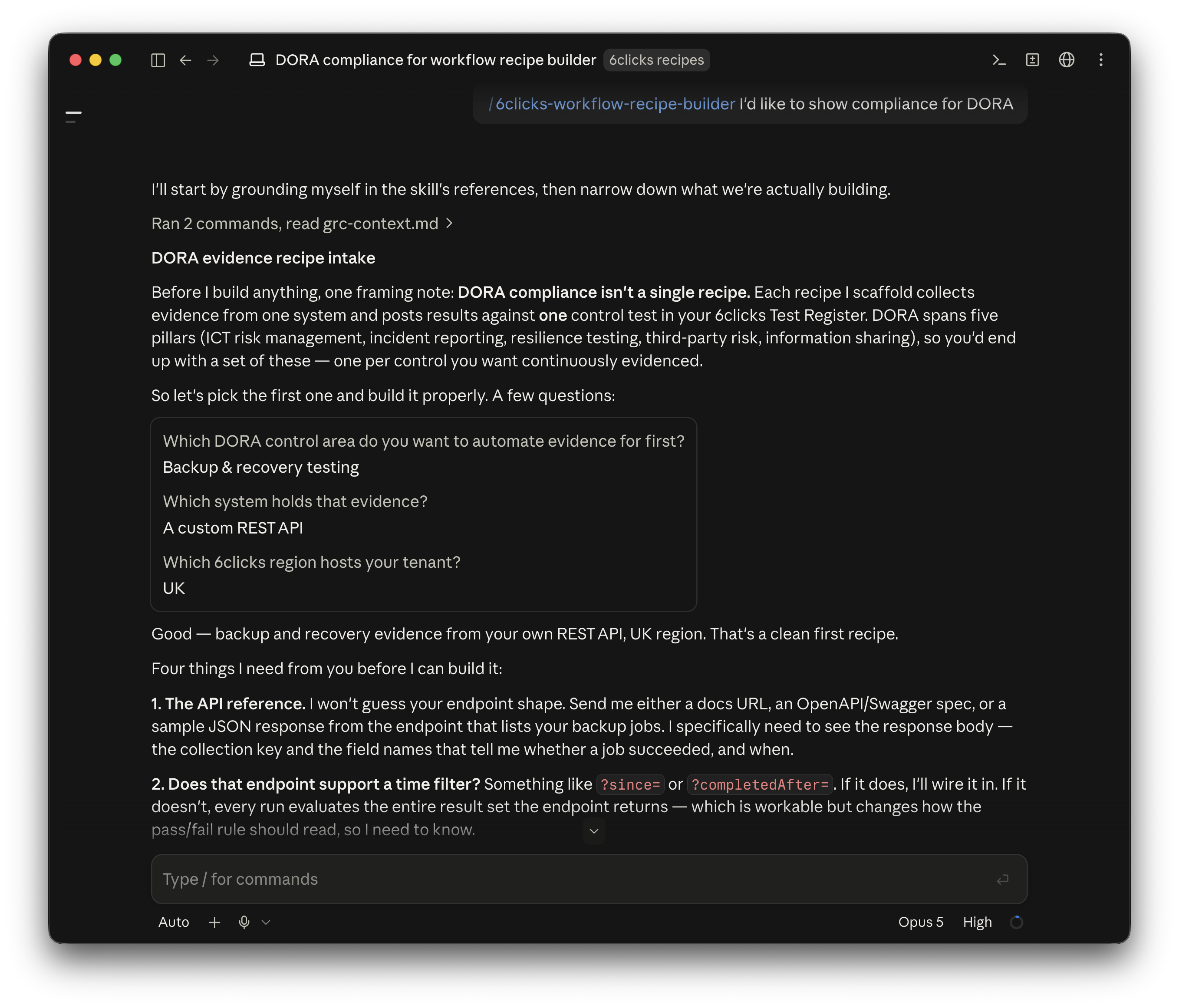
Invoke the skill by name and describe what you want to evidence. For example, in Claude Code that is /6clicks-workflow-recipe-builder; in Codex, /skills or $.
Example prompts:
/6clicks-workflow-recipe-builder I'd like to show compliance evidence for DORA
/6clicks-workflow-recipe-builder collect evidence from Jira that every production change was approved before release
/6clicks-workflow-recipe-builder prove MFA is enforced for privileged accounts in Microsoft Entra ID
/6clicks-workflow-recipe-builder our nightly backup jobs are exposed at https://api.example.com/backup-jobs — evidence the backups complete daily
Start broad if you like. The skill will ask for what it needs:
- The source system and what specifically proves the control.
- The ID REF of the existing control test the results should record against — read it from the ID REF column of the Test Register, not from the browser address bar.
- An API reference, OpenAPI spec or sample response for the source system.
- An email address for run-failure alerts. Operational failures only — test outcomes are never emailed.
- Your 6clicks region.
It will not ask how often the recipe should run. You set that in the trigger step after import.
Note: Never give the agent credentials or API keys. It does not need them, and connections are authorised in the Custom Workflow Builder instead.
The skill returns a .zip file. That zip is the deliverable — the recipe JSON on its own cannot be imported.
Import
The skill walks you through this once the recipe is built. The steps:
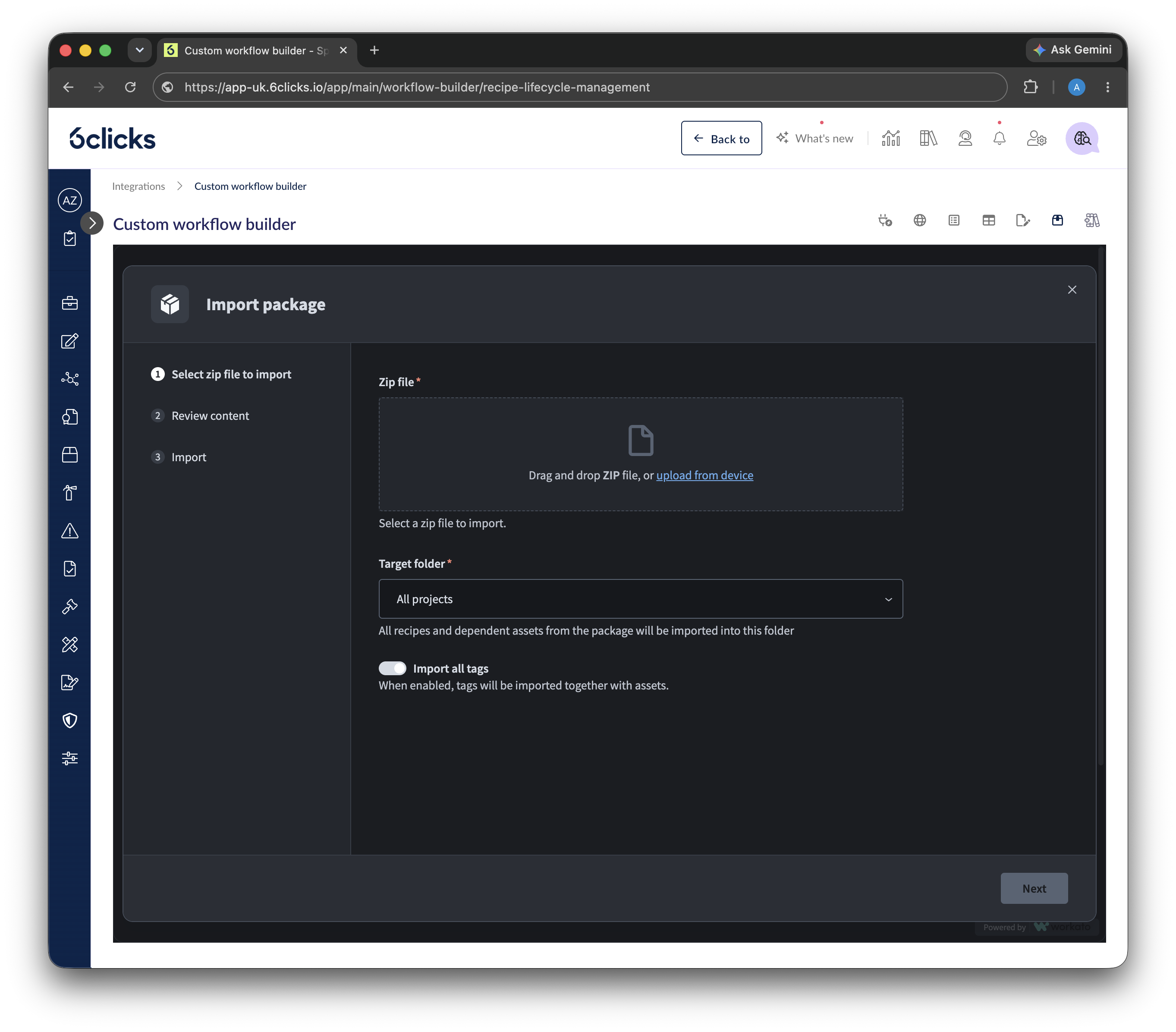
- Check for a name collision first. Open Administration → Integrations → Custom Workflow Builder and check the recipe list. Importing a recipe whose name matches an existing one replaces it.
- Open Recipe lifecycle management (top right) and import the zip.
- Authorise the connections. Each connection is set up on the step that uses it — the editor flags every step that still needs one with an exclamation mark. The 6clicks connection takes your API key and region and is set up on the test-lookup and result-post steps.
- Check the fetch step. The skill builds this step for you — if your source API is already the right shape, it works as is. Swap it for a prebuilt connector's action only if you chose a prebuilt connector such as Jira or Okta over a plain REST call.
- Fix the response schema if your source's response differs from the reference: paste a sample response into the fetch step's schema designer, then click resume guided setup to re-map the fields.
- Run a test. This does not require the recipe to be enabled. Review the result in the Test Register.
- Set the run schedule in the trigger step.
- Enable the recipe.
Do not skip step 6. A wrong ID REF or a paused test otherwise surfaces weeks later as an alert email with no context.
Caveats
- The source system must be reachable from the Custom Workflow Builder. It calls out over the internet. On-premise or IP-restricted sources need to be exposed or allowlisted first.
- Connections can only be set up after import. Secrets are managed in the Custom Workflow Builder and never appear in the recipe file.
- Importing replaces a recipe of the same name. Rename before importing if you want to keep both.
- The recipe never creates the control test. If no suitable test exists, create and activate one in 6clicks first.
- The recipe is best-effort. Recipe JSON has fiddly parts — datapill references, schema blocks — that are hard to get exactly right outside the editor. Expect to finish it in the Custom Workflow Builder.
Troubleshooting
| Symptom | Cause |
|---|---|
| Alert email says the test was not found, but the ID REF is correct and the test is Active | The API key is missing the permission: Register → Tests → View all. The lookup returns an empty result rather than a 403, so the recipe blames the ID REF. Check this permission first. |
|
|
The API key is missing Test result → Create. |
| The ID REF doesn't match anything | The number in the browser address bar is an internal ID, not the ID REF. Read it from the Test Register's ID REF column. |
| No import option, or the workspace looks empty | The Workato workspace has not been provisioned. Open the Custom Workflow Builder once and let the page load fully. |
| The import is rejected | You imported the recipe JSON. Import the zip. |
| An existing recipe disappeared after import | A name collision replaced it. Check the recipe list before importing. |
| Steps show an exclamation mark | Those connections have not been authorised yet. |
| Mapped fields come through empty | The fetch step's declared schema doesn't match the real response. Paste a sample into the schema designer, then re-map with resume guided setup. |
| The skill says it can't scaffold for your region | 6clicks has no connector in that region yet. Do not substitute another region — the 6clicks steps will not resolve. |
Please review these articles for more information on some of the topics discussed in this article:
Getting started with the 6clicks Developer API