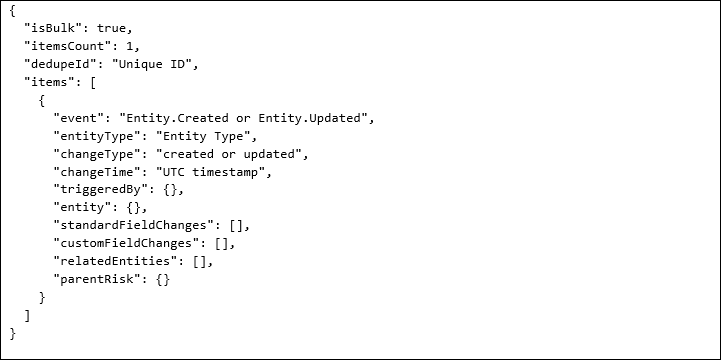
If you would like to use webhooks, please contact 6clicks support requesting for the Entity change event publisher feature to be switched on. In your request, please provide information such as the name of your tenant and which instance your tenant is in.
6clicks has in-app webhook that can be used to help you with integrations and automation, such as generating external notifications for stakeholders.
Table of contents
- Risk treatment plan created
- Register item created
- Register item updated
- Third party created
- Third party updated
- Task created
- Task updated
- Webhook field name mappings
- Payload structure examples
Introduction
6clicks webhooks can be used in the Custom Workflow Builder as well as independently using the webhook endpoints on the 6clicks Developer API.
The following webhook triggers include specific property names in their payloads. These property names can be used when configuring webhook filters. Each trigger exposes a defined set of properties that may appear in the event payload.
All triggers support bulk delivery.
Supported triggers
The trigger events we currently support are listed below.
Risk created
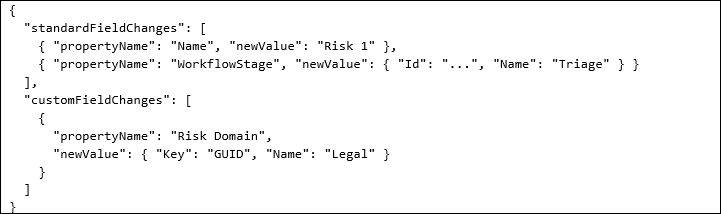
This trigger is raised when a new Risk is created in the Risk Register.
- Trigger fires within 30 seconds of risk creation
- Works for risks created via UI or API
- Event includes risk ID, creator, creation date
- Event includes risk name, description, owner (if assigned), and risk rating (if provided)
Payload characteristics
- event = "Entity.Created"
- changeType = "created"
- standardFieldChanges contains initial field values
- customFieldChanges may include default custom values
- relatedEntities typically empty
Example
Risk updated
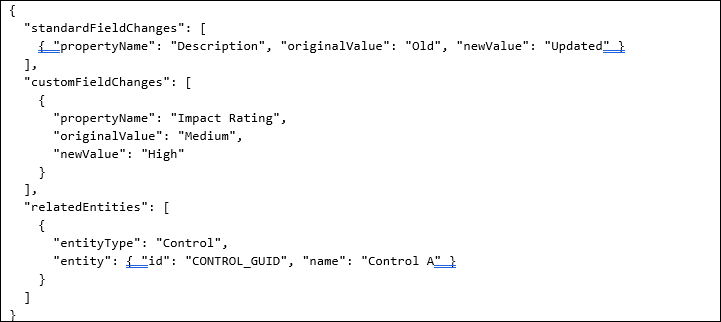
This trigger is raised when an existing Risk is updated.
- Trigger fires when any risk field changes
- Event includes the fields which were changed and previous values
- Event includes risk ID, changed by user, and timestamp
- Event includes new field values
Payload characteristics
- event = "Entity.Updated"
- May contain:
- standardFieldChanges
- customFieldChanges
- relatedEntities
- Any combination of the above
Example
Risk owner changed
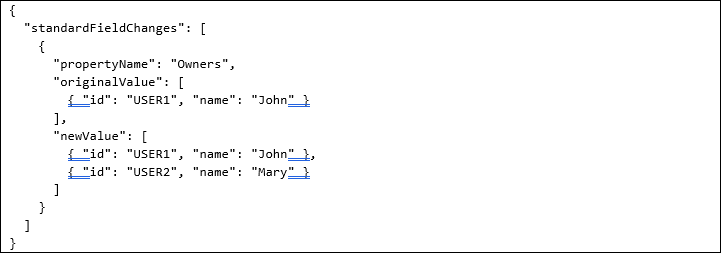
This trigger is raised when the owner(s) of a Risk are added or removed.
- Trigger fires when risk owner field changes
- Covers all ownership scenarios:
- New assignment (no owner → has owner)
- Reassignment (owner A → owner B)
- Unassignment (has owner → no owner)
- Handles multiple owners assignment
- Event includes risk details, new owner(s), previous owner(s)
- Event includes risk ID, risk name, and timestamp
- Event includes the user who made the change
Payload characteristics
- event = "Entity.Updated"
- standardFieldChanges contains propertyName = "Owners"
- Owners represented as array of objects
Example
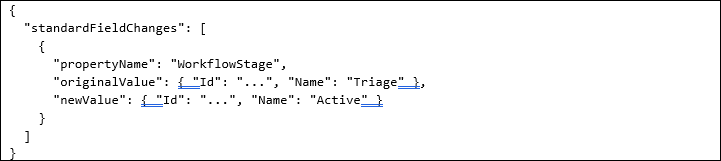
Risk workflow stage changed
This trigger is raised when the Workflow Stage of a Risk is updated.
- Trigger fires on any stage transition
- Supports custom stage names and workflows
- Event includes from/to stages, transition timestamp
- Event includes risk ID, risk name, and the user who changed stage
Payload characteristics
- event = "Entity.Updated"
- standardFieldChanges contains WorkflowStage
Example
Risk custom field changed
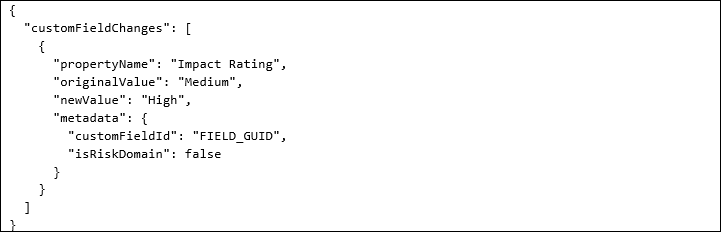
This trigger is raised when one or more custom fields of a Risk are updated.
- Trigger configurable by specific custom field
- Supports conditional triggers (field = specific value)
- Works with different field types (text, dropdown, checkbox, date)
- Event includes field name, old value, new value
- Event includes risk ID, changed by user, timestamp
Payload characteristics
- event = "Entity.Updated"
- customFieldChanges contains entries
- standardFieldChanges typically empty
- customFieldId identifies the field
Example
Risk assessment created
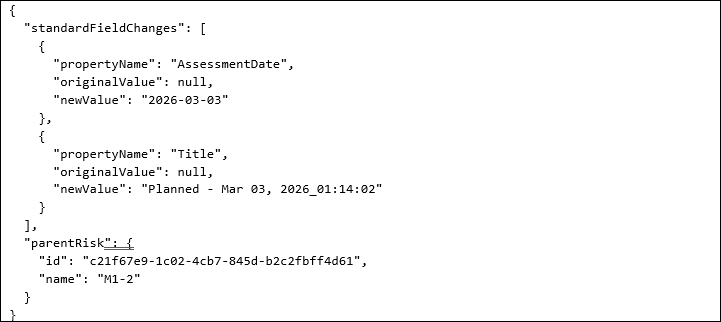
This trigger is raised when a new Risk Assessment is created for a Risk.
- Trigger fires within 30 seconds of risk assessment creation
- Works for risk assessments created via UI or API
- Event includes risk assessment ID, type, assigned users, due date
- Event includes risk assessment name and user who created the risk assessment
Payload characteristics
- event = "Entity.Created"
- entityType = "Risk Assessment"
- standardFieldChanges contains initial assessment values
- originalValue = null during creation
- parentRisk contains associated Risk details
- customFieldChanges typically empty
- relatedEntities typically empty
Example
Risk treatment plan created
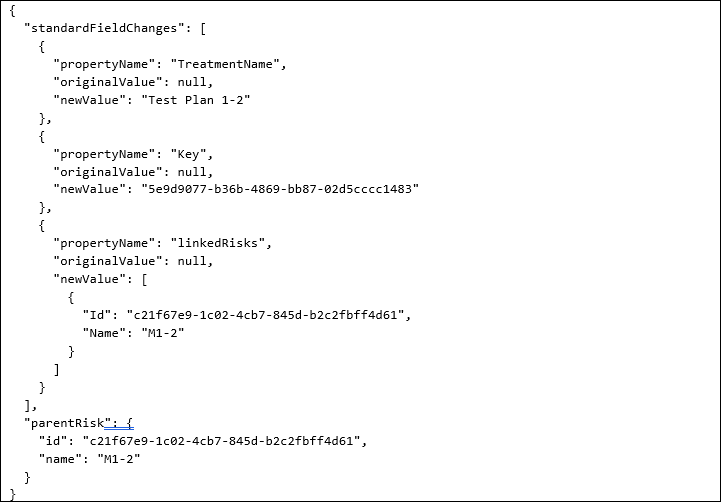
This trigger is raised when a new Risk Treatment Plan is created and associated with a Risk.
- Trigger fires within 30 seconds of new risk treatment plan creation
- Works for RTPs created via UI or API
- Event includes RTP ID, title, assigned owner, due date
- Event includes linked risk (if applicable)
Payload characteristics
- event = "Entity.Created"
- entityType = "Risk Treatment Plan"
- standardFieldChanges contains initial treatment plan values
- originalValue = null during creation
- linkedRisks appears inside standardFieldChanges
- parentRisk contains associated Risk details
- customFieldChanges typically empty
- relatedEntities typically empty
Example
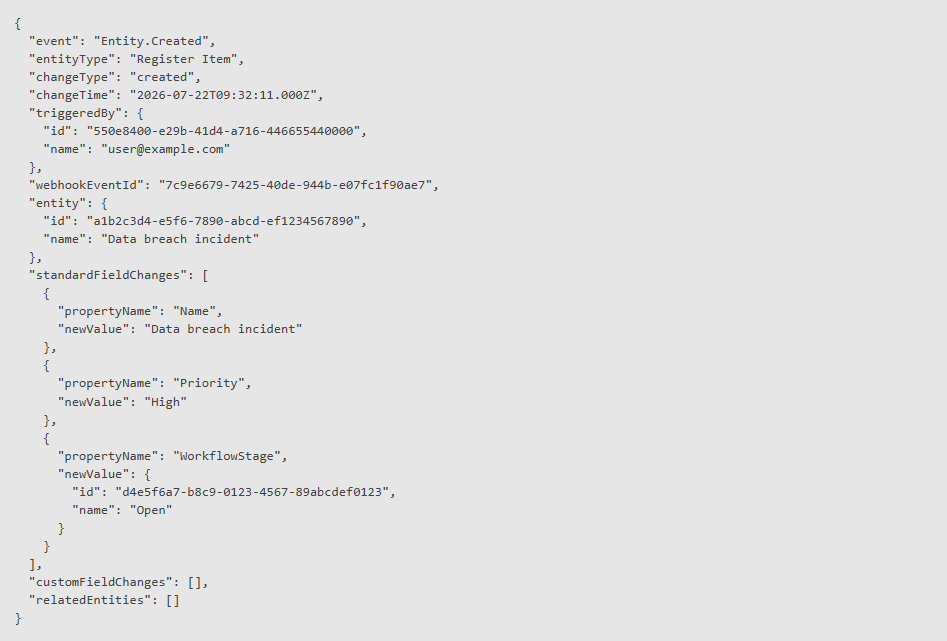
Register item created
This trigger is raised when a new Register Item is created.
- Trigger fires within 30 seconds of register item creation
- Works for register items created via UI or API
- Event includes register item ID, creator, creation date
- Event includes register item name, description, status, priority, and workflow stage (if provided)
Payload characteristics
- event = "Entity.Created"
- entityType = "Register Item"
- changeType = "created"
- standardFieldChanges contains initial field values
- customFieldChanges may include default custom values
- relatedEntities typically empty
Example
Register item updated
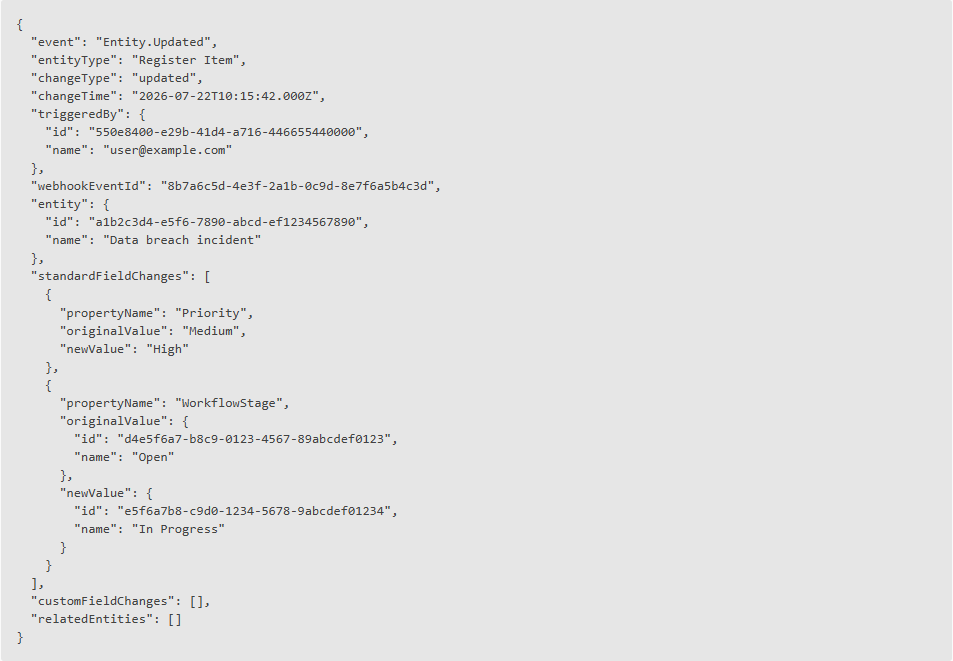
This trigger is raised when an existing Register Item is updated.
- Trigger fires when any register item field changes
- Event includes the fields which were changed and previous values
- Event includes register item ID, changed by user, and timestamp
- Event includes new field values
Payload characteristics
- event = "Entity.Updated"
- entityType = "Register Item"
- May contain:
- standardFieldChanges
- customFieldChanges
- Any combination of the above
Example
Third party created
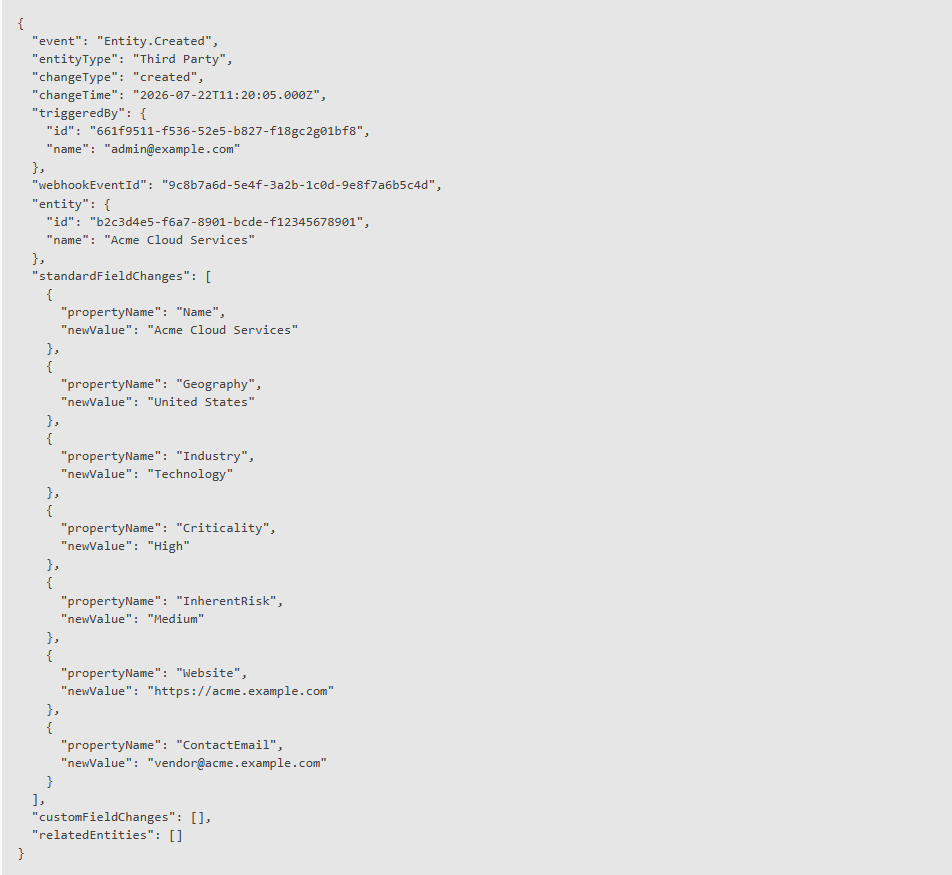
This trigger is raised when a new Third Party is created.
- Trigger fires within 30 seconds of third party creation
- Works for third parties created via UI or API
- Event includes third party ID, creator, creation date
- Event includes third party name, geography, industry, criticality, inherent risk, website, and contact email (if provided)
Payload characteristics
- event = "Entity.Created"
- entityType = "Third Party"
- changeType = "created"
- standardFieldChanges contains initial field values
- customFieldChanges may include default custom values
- relatedEntities typically empty
Example
Third party updated
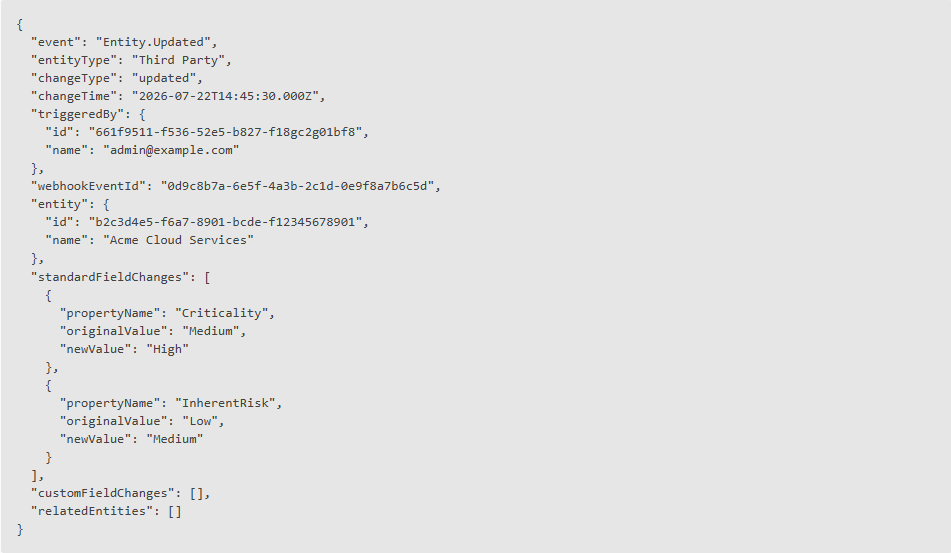
This trigger is raised when an existing Third Party is updated.
- Trigger fires when any of the following third party fields change: name, geography, industry, criticality, inherent risk, website, contact email, or archive status.
- Event includes the fields which were changed and previous values
- Event includes third party ID, changed by user, and timestamp
- Event includes new field values
Payload characteristics
- event = "Entity.Updated"
- entityType = "Third Party"
- May contain:
- standardFieldChanges
- customFieldChanges
- Any combination of the above
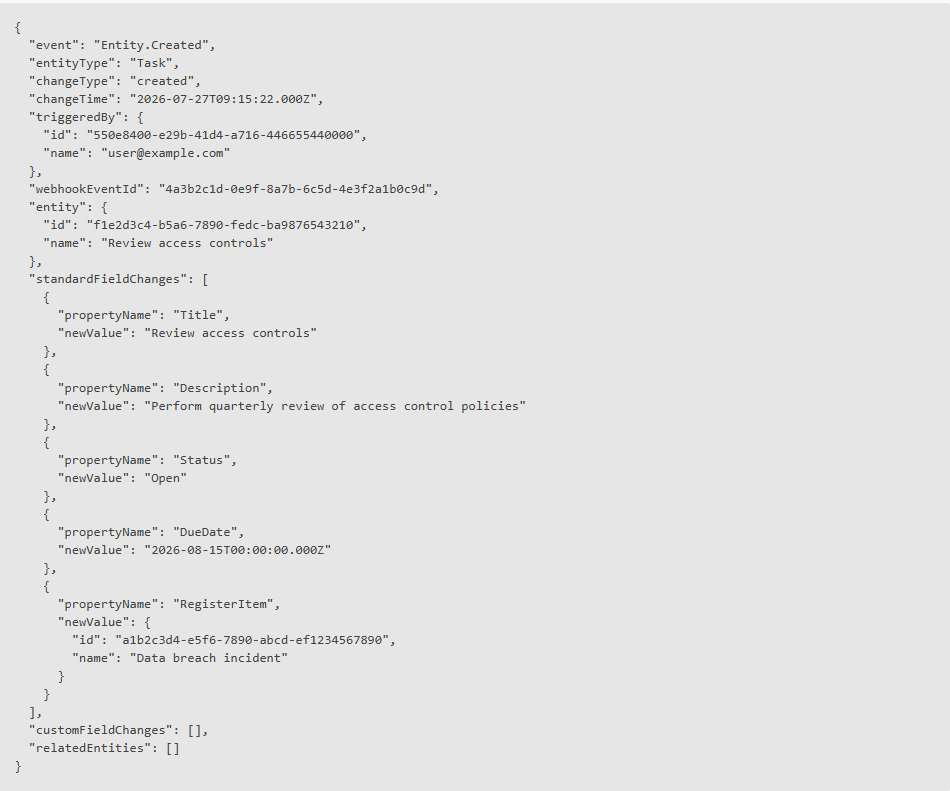
Task created
This trigger is raised when a new Task is created on a Register Item.
- Trigger fires within 30 seconds of task creation
- Works for tasks created via UI or API
- Event includes task ID, creator, creation date
- Event includes task title, description, status, due date, and the parent register item it belongs to
Payload characteristics
- event = "Entity.Created"
- entityType = "Task"
- changeType = "created"
- standardFieldChanges contains initial field values
- standardFieldChanges includes RegisterItem (parent register item ID and name)
- customFieldChanges typically empty
- relatedEntities typically empty
Example
Task updated
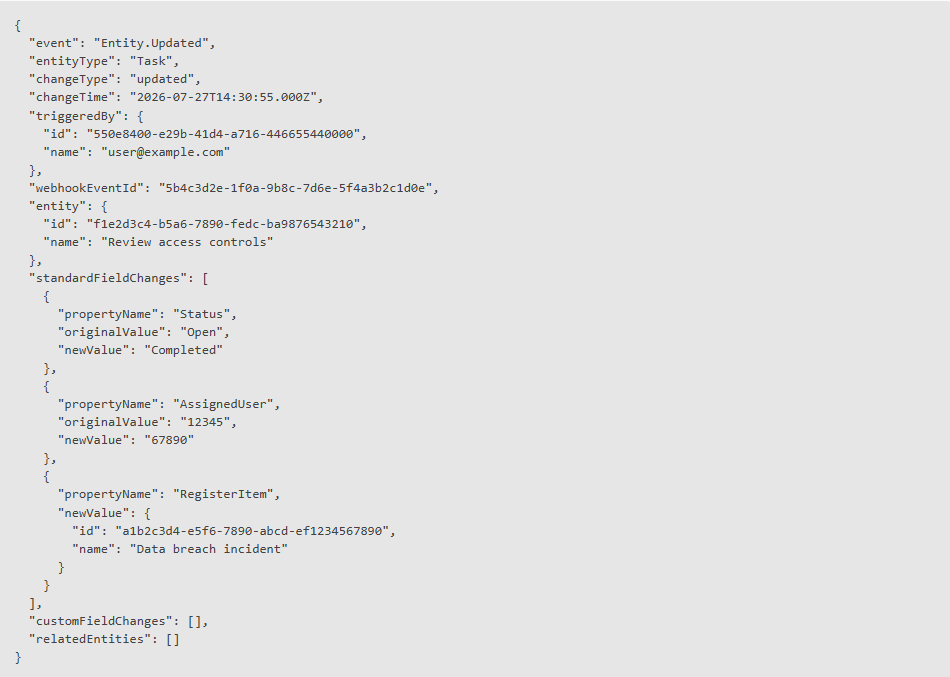
This trigger is raised when an existing Task is updated.
- Trigger fires when any task field changes
- Event includes the fields which were changed and previous values
- Event includes task ID, changed by user, and timestamp
- Event includes new field values
- Event includes the parent register item the task belongs to
Payload characteristics
- event = "Entity.Updated"
- entityType = "Task"
- May contain:
- standardFieldChanges
- customFieldChanges
- standardFieldChanges includes RegisterItem (parent register item ID and name) for context
- Any combination of the above
Example
Webhook field name mappings
Risks
The below shows how the names of properties appear in the payload compared with the Developer API and UI.
|
Webhook |
Developer API |
Application UI |
|
Name |
name |
Title |
|
Description |
description |
Description |
|
Key |
id |
- |
|
WorkflowStage |
workflowStage |
Current stage |
|
CommonCause |
commonCause |
Common cause |
|
LikelyImpact |
likelyImpact |
Potential impact |
|
Owners |
owners |
Risk Owners |
|
Tags |
tags |
Tags |
|
TreatmentName |
treatmentName |
Treatment plan |
|
TreatmentDate |
treatmentDate |
Due date |
|
LinkedRisks |
risksRelationships |
Linked data |
|
IsArchived |
isArchived |
- |
|
TreatmentDecision |
decision |
Treatment decision |
|
TreatmentStatus |
status |
Treatment status |
|
RiskRating |
riskRating |
Risk rating |
|
Title |
title |
Risk assessment title |
|
AssessmentDate |
assessmentDate |
Risk assessment date |
|
RiskDomain |
riskDomain.selectedCustomAttributeDetails.Name |
Risk Domain |
Payload structure examples
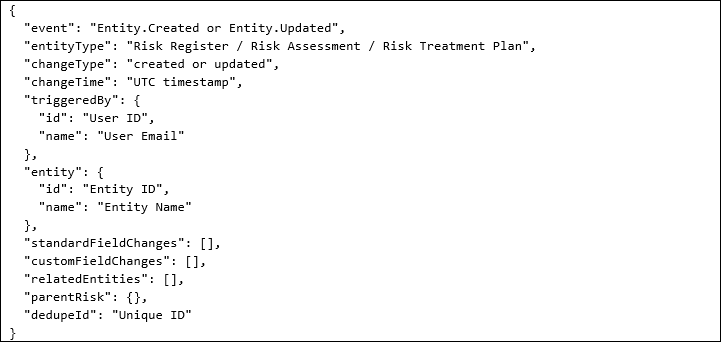
The structure of webhook payloads is further documented in the Developer API swagger file.
Webhook example (single event)
Webhook example (bulk)